
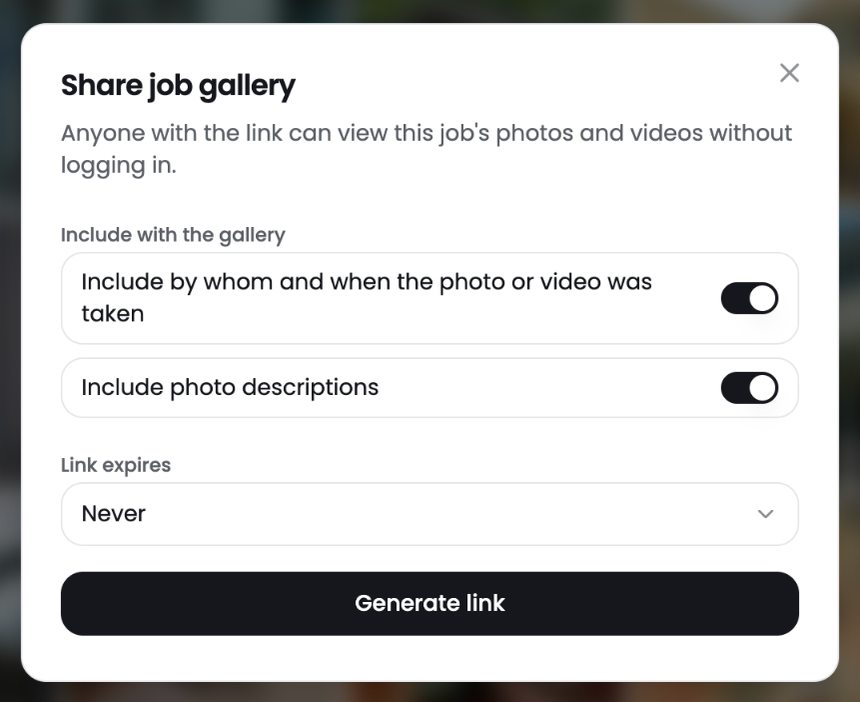
Share a job gallery when a customer, adjuster or partner needs to see the photos. Anyone with the link can view the job's photos and videos without logging in.
Create a gallery link
- Open the job.
- Click Share at the top right.
- Choose what to include. Turn on Include by whom and when the photo or video was taken to show the photographer and time. Turn on Include photo descriptions to show your notes.
- Pick when the link expires under Link expires. The default is Never.
- Click Generate link and copy it.
Paste the link in an email or text message. New photos added to the job show up in the gallery.
Tip: Set an expiry date when you share with someone outside your company for a short time.
Other ways to share
- Share one photo from the photo viewer with the Share button.
- Build a PDF report for a polished, branded summary.